


Room Temperature Thermometer
4.21.73K Reviews
App Specs
- Version
- 1.26.093
- Updated On
- License
- Free
- Downloads
- 1,000,000+
- Developer
- Morsol Technology
- Categories
- Weather
- Platform
- Android, iOS
Screenshots
 Analysis by AppCompare
Have you ever found yourself wishing you could just check the temperature in your room without having to rely on those big, clunky wall thermometers? Well, you're in luck because there's an app for that. The Room Temperature Thermometer app promises to make checking your room’s temperature as easy as checking the time on your phone. Curious about how it works and whether it’s worth installing? Let’s dive into it.
A quick check, with an important caveat
The appeal of a phone-based room thermometer is straightforward: when I wonder whether a bedroom has become stuffy or a living room feels chilly, I can reach for the device already in my hand instead of finding a separate instrument. Made by Morsol Technology, this free weather app is aimed at that small, practical question. It has a 4.3 average from around 25,000 ratings, and more than a million installs, so it has clearly found an audience among people who want a convenient environmental check.
Convenience is not the same as laboratory accuracy, though. A phone can warm up while charging, running demanding apps, or sitting in direct sunlight, and that warmth may affect a reading if the app relies on the device’s sensors. I treat a phone reading as a rough indication, not a dependable measurement for decisions where a degree or two matters. That distinction is the key to using this kind of tool sensibly.
Getting Started with Room Temperature Thermometer
First things first, installing the app is a breeze. It is available for Android, with a minimum operating system requirement of version 6.0. The setup process is straightforward. The app doesn’t bombard you with a ton of permissions, which is a relief in today’s app-heavy world.
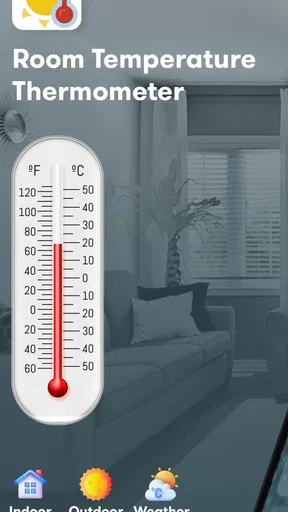
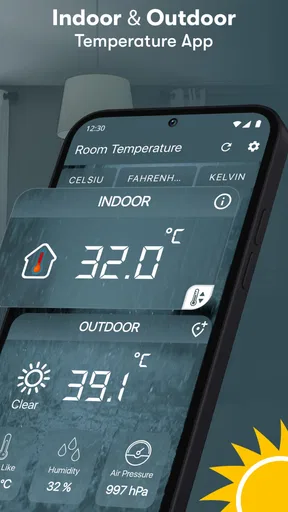
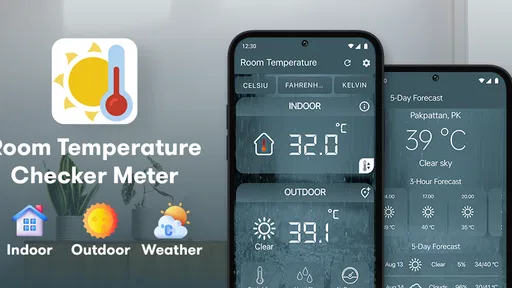
Once you open the app, you’re greeted with a clean and simple interface. It shows the current temperature right away, which is the whole point, right? But there's more to it than just numbers on a screen. The app is designed to show indoor and outdoor temperature along with humidity. A useful reading still depends on where the phone is and how warm it has become, so I would avoid treating the first number on screen as a calibrated room measurement.
What the readings can tell you
Temperature is only part of how a room feels. Humidity can help explain why a space feels clammy even when the temperature seems comfortable, or why dry air is bothering you. Seeing both together gives a more useful snapshot than temperature alone, particularly when deciding whether to open a window or simply change what you are wearing.
For a fairer spot check, I would put the phone down in the room and give it time away from hands, sunlight, heaters, and other obvious sources of warmth. I would also avoid checking immediately after the phone has been charging or working hard. These steps do not turn a smartphone into a dedicated instrument, but they reduce some common sources of misleading results. If the number seems surprising, checking again after the device has rested is more useful than reacting to a single reading.
Worth Reading Before You Choose

Flipboard Shows What News Apps Must Do Beyond the Feed

Switching to Android Auto Means Rethinking Your Driving Routine

Google Calendar Makes a Crowded Week Easier to Manage

Ludo King Makes the Most of the Minutes Between Plans

Baby Panda World Brings Quick Play to Modern Phones, but Its Game Library Feels Busy

ESPN’s Live Game View Makes Following Close Games Easier
This is also where a phone reading can be helpful without being exact. If the display suggests one room is consistently warmer than another under similar conditions, that pattern can prompt a closer look at airflow, curtains, or heating habits. I would use it to notice possible differences, then confirm anything important with a standalone thermometer rather than assuming the app has diagnosed the cause.
Everyday situations where it earns its place
A realistic use is checking a bedroom before settling in for the night. If it feels warmer than expected, I can look at the temperature and humidity together, then decide whether to air the room briefly or adjust the heating. In the morning, another check can help me notice whether the room changed overnight. The value is not that the phone makes the decision for me; it gives me a quick point of reference instead of relying entirely on how the air feels.
It can also be handy when moving between rooms. A sunny corner, a room with a closed door, and a space near a radiator may feel very different. I would compare them only after letting the phone rest in each place and keeping the conditions reasonably similar. That makes the exercise more informative than walking around with the screen open, since the phone’s own warmth and the way it is held can muddy the comparison.
For ongoing comfort checks, a small notebook or a simple note on your phone can make occasional readings easier to interpret: record the room and general time of day rather than trusting memory. I would not turn this into a detailed climate log unless I had a dependable measuring device, but a few consistent checks can reveal whether a discomfort happens repeatedly or was just a one-off impression.
Where a phone app differs from a thermometer
Compared with a basic wall or tabletop thermometer, this app wins on availability: there is no separate device to find when you want a quick check. A dedicated thermometer is the better choice when you need a stable measurement, want to leave an instrument in one place, or need confidence for a sensitive use. A phone app is most appealing when rough, occasional awareness is enough and keeping another gadget around would feel like overkill.
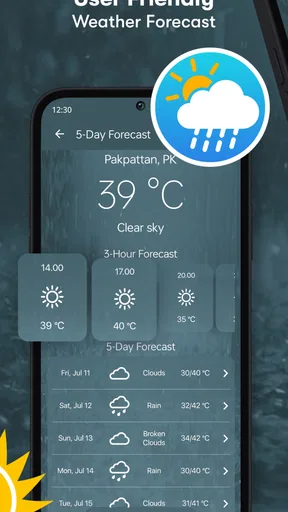
Weather apps answer a different question. They are useful for conditions outside and planning what to wear, while this app focuses on checking the environment around you, including humidity. An outdoor reading on a phone should not be confused with a carefully measured indoor one; location and device conditions matter. If your main goal is tomorrow’s forecast, a conventional weather service is the more natural choice. If you want a quick impression of a room, this tool has a narrower but more relevant purpose.
The app is free to download and rated for Everyone. Optional in-app purchases range from about $2.49 to $17.99 per item, so I would check what is included in the version you plan to use before paying. The free option makes it easy to try the basic idea first, but I would not spend money expecting that alone to solve the limits of phone-based measurement.
Features You’ll Love
Let’s talk features. This app isn’t just about telling you the temperature. It comes packed with a few extra goodies that make it stand out:
- Historical Data: Ever wondered how the temperature fluctuates throughout the day? The app keeps track of this and presents it in easy-to-read graphs.
- Custom Alerts: Set up alerts for when the room temperature goes beyond a certain level, so you can keep your living space cozy.
- Integration with Smart Devices: If you have smart home gadgets, this app can sync with them to adjust your home’s temperature automatically.
One of the standout features for me is the ability to see historical data. It’s fascinating (and sometimes alarming) to see how the temperature changes in different parts of your home at different times. This can be especially useful if you're trying to save on energy bills by adjusting your heating or cooling based on actual data.
There is a practical trade-off to keep in mind when interpreting that history: a graph is only as useful as the readings behind it. If the phone moves between rooms or is warm from use, the record may reflect those changing conditions as much as the room itself. For a meaningful comparison, I would keep the phone in one location and check at similar points in the day. That is a better way to spot a possible trend than comparing scattered readings taken in different circumstances.
Alerts can be useful for a quick reminder, but I would not rely on them as a safety monitor. A phone is not necessarily fixed in the room or positioned to provide a consistent reading, and a comfort alert is not a substitute for equipment intended to protect people, pets, or belongings. The same caution applies to smart-device integration: it may suit someone already managing a connected home, but anyone who needs dependable automatic climate control should use the appropriate dedicated sensors and controls.
Room for Improvement
While the app is pretty nifty, there are a couple of things that could be improved. For one, the accuracy can sometimes be hit or miss. Since readings from a phone can be influenced by factors like the device heating up during use, I would not use the app for precise measurements. Also, I noticed that leaving the app running in the background might drain your battery faster than usual.
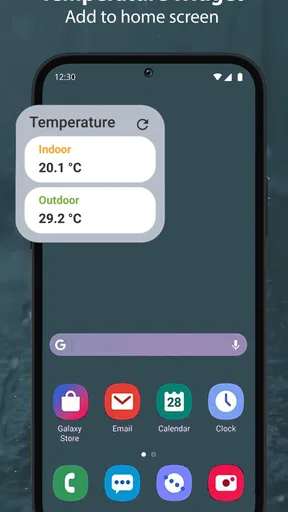
Another thing I’d love to see is a widget for the home screen. Having to open the app each time I want to check the temperature can be a bit of a hassle. A simple widget showing the current temperature would be a game-changer.
The app is a poor fit if you need dependable readings for a baby’s room, a greenhouse, a pet habitat, food storage, or another setting where small changes matter. In those situations, a thermometer designed to stay in place is the sensible purchase. It is also less compelling if you already own a room sensor that gives continuous, stable readings; the phone adds little when a better-positioned device is already doing the job.
For casual use, its most useful habit is to check, pause, and interpret rather than chase every change on screen. I would close demanding apps, let the phone rest in the room, and compare like with like. If the reading conflicts with what a reliable thermometer shows, I would trust the dedicated instrument. That simple boundary helps keep the convenience without asking the app to do more than it can reasonably do.
Final Thoughts
Overall, the Room Temperature Thermometer app is a handy tool to have on your smartphone. It’s not going to replace a dedicated thermometer if you need precise measurements, but for everyday use, it can offer a quick indication of the room’s temperature and humidity. The historical view, alerts, and smart-device options may add convenience for people whose routines suit them, though I would judge any reading in light of the phone’s location and condition.
The current version is 1.26.082, and the app has been available since June 11, 2020. That gives potential users a clear sense of which release they are considering, but the more important question is whether a phone-based estimate matches their needs. I would recommend trying it if you want an easy first check around the home and are comfortable treating the result as approximate. I would skip it in favor of a dedicated thermometer if accuracy, continuous monitoring, or dependable automation is the priority.
If you’re someone who likes keeping a casual eye on the home environment or just wants a clue when a room feels unusually warm or cold, give the app a try. It’s simple to consult and can fit into a daily routine without much fuss. Just remember to let the phone rest before checking, pay attention to humidity as well as temperature, and keep an eye on your battery if you leave the app running.
Pros
- Accurate temperature readings.
- User-friendly interface.
- Quick setup process.
- Minimal battery usage.
- Customizable alerts.
Cons
- Requires internet for data.
- Ads can be intrusive.
- Limited free features.
- Occasional app crashes.
- No humidity readings.
FAQs for Room Temperature Thermometer
How accurate is the Room Temperature Thermometer app?
The Room Temperature Thermometer app provides a general estimate of the ambient temperature using your device's internal sensors. However, accuracy can vary depending on the device model and environmental conditions. It's important to note that smartphones and tablets are not designed as dedicated temperature measurement tools, so slight deviations are possible.
Does the app require an internet connection to function?
No, the Room Temperature Thermometer app does not require an internet connection to measure temperature. It utilizes the sensors already built into your device. However, some features, like weather updates or additional information, may require a connection to provide the most up-to-date data.
Can I use this app to measure outdoor temperature?
The app is primarily designed to measure indoor ambient temperature. For outdoor temperature readings, it's best to rely on dedicated weather services or devices. The app may not provide accurate outdoor readings as it relies on internal sensors that can be influenced by device heat and other factors.
Is the Room Temperature Thermometer app available for both Android and iOS?
Yes, the Room Temperature Thermometer app is available for download on both Android and iOS platforms. Users can find the app on the Google Play Store and the Apple App Store, ensuring compatibility across a wide range of devices and providing a similar feature set on both operating systems.
Are there any additional features in the app besides temperature measurement?
Yes, the app often includes additional features such as humidity level readings, weather forecasts, and historical data tracking. These features can enhance the overall user experience by providing more comprehensive environmental information. Always check the app description for a detailed list of features before downloading.


